Keeping your data updated with real-time information is essential for effective fleet management. The Refresh Widget allows you to set automatic intervals for data updates, ensuring the displayed information remains current without manual input.
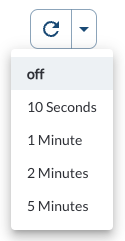
Steps to Set a Refresh Interval
- Locate the Refresh Widget at the top of the page
- Click on the dropdown menu to view the available interval options
- Select the interval that suits your operational needs
- The dashboard will automatically refresh at the chosen frequency
Available refresh intervals include:
- 10 seconds
- 1 minute
- 2 minutes
- 5 minutes
Tip
By using the refresh feature, you minimize the risk of outdated data impacting
your decisions. Ensure the interval aligns with the criticality of the data
being monitored.