The Custom Report Widget allows you to build, save, and manage report configurations using your selected filters, columns, sorting, and grouping. This lets you quickly return to the same report setup without reconfiguring it each time.
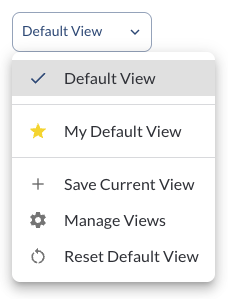
Save Current Report Configuration
Note
Saving a report configuration captures: selected filters, visible columns,
sorting order, grouping settings
Default Report
Reset to Default Report
If you modify a report and want to return to the default configuration:
Steps to reset
- Click on the custom report widget
- Select Reset Default View

The report immediately returns to the saved default setup.
Schedule a Saved View
You can schedule a saved view to be automatically generated and delivered to selected recipients on a recurring basis.
Steps to schedule a report
- Click on the custom report widget.
- Select the saved view you want to schedule.
- Click Schedule "[View Name]" from the menu.
- Configure the schedule settings:
-
Schedule Name – Defaults to the saved view name. Edit if needed.
-
Reported Date Range – The date range the report will cover each time it runs (e.g., Last 7 days).
-
Frequency – How often the report is sent: Daily, Weekly, or Monthly. For Weekly, select the day of the week.
-
Send Time – The time of day the report should be delivered.
-
Format – Select CSV or XLSX.
-
Recipients – Enter up to 20 email addresses. Type an email and press Enter or comma to add each recipient.
- Click Save.
Note
This schedule re-runs the saved view on cadence. Editing the view's filters
later will affect the next send. To manage all scheduled reports, see How
to Use
Scheduled Reports.
Manage Saved Report
You can rename or delete saved report configurations from the Manage Views screen.
Steps to manage reports
- Click on the custom report widget
- Select Manage Views
- In the Manage Views window:
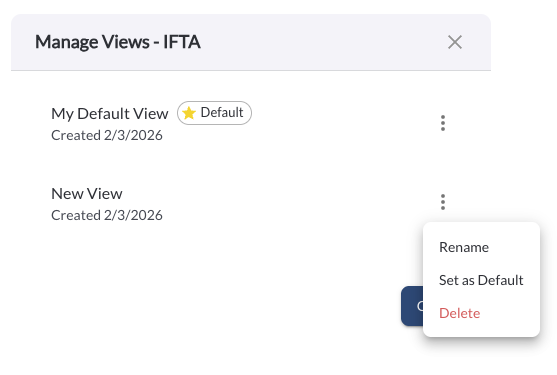
- Click the three‑dot menu next to a report
- Select Rename to update the report name
- Select Delete to permanently remove the report
- Select Set as Default to change the default view
Note
Deleted views cannot be recovered once removed. The default view is clearly
indicated with a star icon, and any changes made to view configurations
take effect immediately after saving.