The Fault Codes page displays a list of all open diagnostic trouble codes (DTCs) across your fleet. Use this view to quickly identify active vehicle issues and decide when maintenance or further investigation is needed.
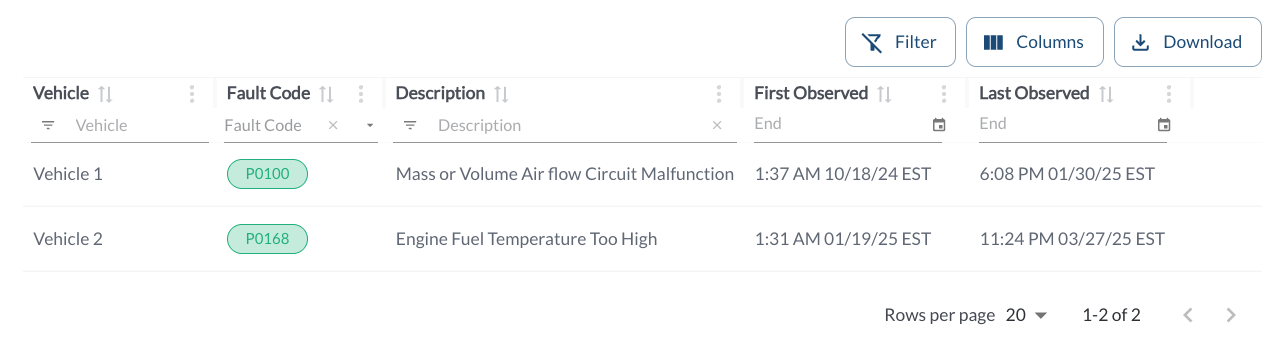
Fault Codes Details
The table displays all the fault codes issues across the fleet, allowing you to efficiently organize and access issue details. It supports downloading, sorting, filtering, resizing columns, and other customization options. For a complete guide, refer to the article How to Use Table Options.
The table includes the following columns, each providing specific maintenance issue information:
| Vehicle |
The name of the vehicle with an open maintenance issue |
| Fault Code |
A diagnostic code identifying the issue. For more details, refer to the article Understanding Fault Codes (DTC)
|
| Description |
A brief explanation of the fault or issue |
Observed At |
The timestamp when the fault was first detected. This helps track how long the issue has been active. |
Closed At |
The timestamp when the fault was resolved or cleared. If the field is empty, the issue is still open. |
Active |
Indicates whether the fault is currently active (Yes) or has been resolved (No). |
| Tags |
Custom tags that help categorize and group issues. Tags can be added and managed in the Settings Page. For more details on how to create and assign new tags, refer to the article Tags Settings. |