The Overdue Scheduled Maintenance Report helps fleet managers identify vehicles with maintenance services that are past their scheduled due date. This allows for timely intervention to reduce breakdowns, improve safety, and extend vehicle life.
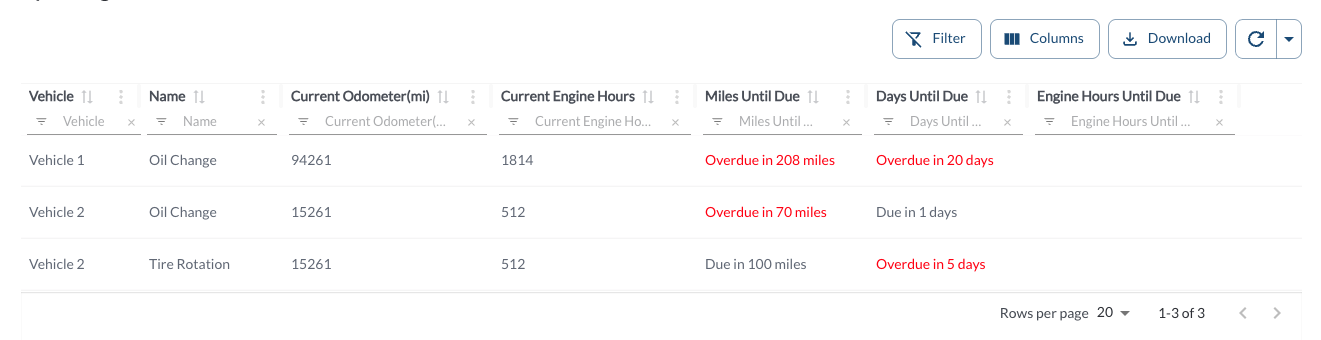
Overdue Scheduled Maintenance Details
The report displays all fleet maintenance services that are past due, helping you quickly identify vehicles that require immediate attention. It supports downloading, sorting, filtering, resizing columns, and other customization options. For a complete guide, read the article How to Use Tables in the App.
The table includes the following columns, each providing specific maintenance scheduling details:
| Vehicle |
The name of the vehicle associated with the overdue maintenance |
| Name |
The name of the scheduled service (e.g., Oil Change, Brake Inspection) |
| Current Odometer |
The vehicle’s current odometer reading |
| Current Engine Hours |
The total engine run time recorded for the vehicle |
| Miles Until Due |
Displays how many miles remain until the service is due |
| Days Until Due |
Displays how many days remain until the service is due |
| Engine Hours Until Due |
Displays how many engine hours remain until the service is due |
Refresher Widget
Keep your data up to date by using the Refresher Widget. This allows you to reload the table data so you're always viewing the latest information. To learn more, read the article How to Set the Refresher Widget.