The Vehicle Geofence Report records all vehicle entries and exits from geofences configured in the system. This report helps fleet managers understand how vehicles interact with defined boundaries, providing actionable data for operational oversight.
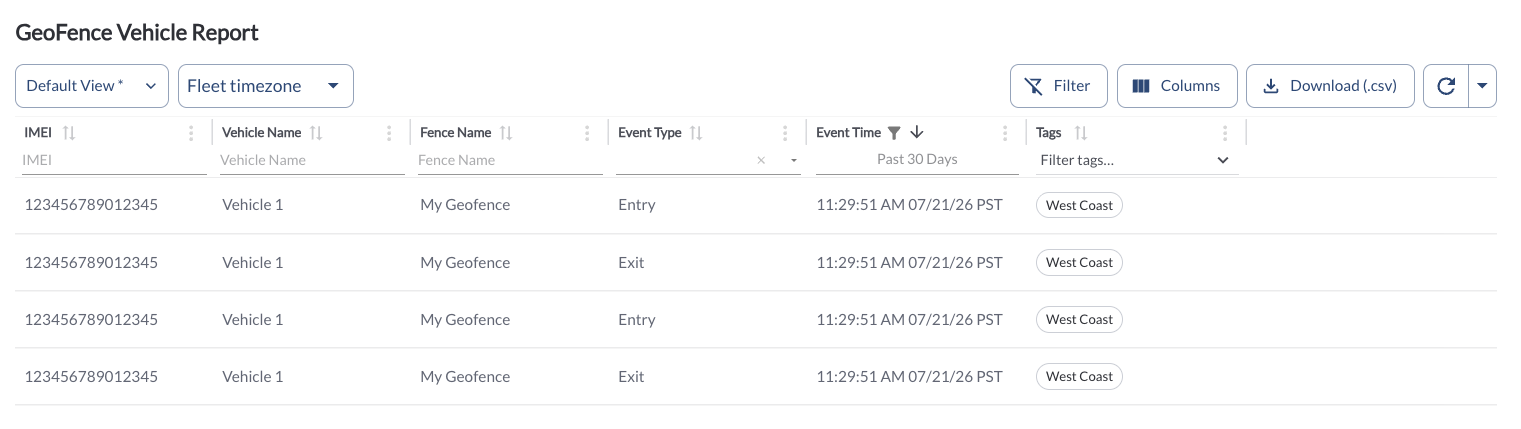
Geofence Activity Details
The table displays all fleet geofence activity, allowing you to efficiently organize and access the details. It supports downloading, sorting, filtering, resizing columns, and other customization options. For a complete guide, read the article How to Use Tables in the App.
The table includes the following columns, each providing specific geofence activity information:
| IMEI |
The unique identifier for the device associated with the vehicle |
| Vehicle Name |
The name of the vehicle associated with the geofence event. |
| Fence Name |
The name of the geofence where the event occurred |
| Event Type |
Indicates whether the event was an entry or exit
|
| Fence ID |
The unique identifier of the geofence |
| Event Time |
The timestamp of when the entry or exit occurred |
| Tags |
The tags associated with the vehicle. Tags can be added and managed in the Settings Page. For more details on how to create and assign new tags, refer to the article Tags Settings. |
Filtering
Refresher Widget
Keep your data up to date by using the Refresher Widget. This allows you to reload the table data so you're always viewing the latest information. To learn more, read the article How to Set the Refresher Widget.
Custom Report Widget
Save time by using the Custom Report Widget to store report configurations with your selected filters, columns, sorting, and grouping. This allows you to quickly return to commonly used report setups and set a default configuration for easy access. For more information, read the article How to Use the Custom Report Widget.