The RZ41 AI Vision Hub expands the RoadEazy RZ1 Vehicle Gateway, adding up to four auxiliary cameras per unit. This gives fleets full coverage of blind spots, cargo areas, and equipment zones. For larger setups, two RZ41s can be linked to a single RZ1, supporting up to eight cameras total.
The RZ41 hub mounts discreetly under the dashboard, with LED indicators confirming power and video signals once installation is complete.
Installation Steps
- Connect Cameras -
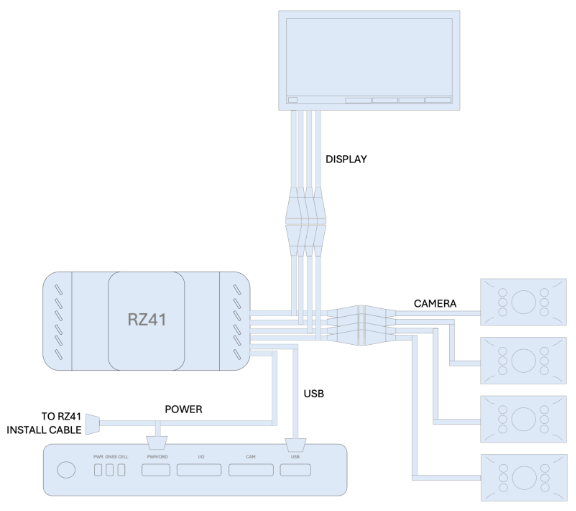
- Plug each auxiliary camera into the on of the four Video In ports on the RZ41.
- Ensure connectors click and lock in place.
- For third-party cameras, adapters or cables may be required (not included in the RZ41 package).
-
Connect to the RZ1 Vehicle Gateway -
- Power off the RZ1 before making connections.
- Plug the RZ41 USB cable into the RZ1 USB port and tighten the safety screw.
- Unplug the RZ1 power cable, then: Connect the RZ41 power cable into the RZ1.
- Plug the vehicle’s original power cable into the female socket on the RZ41 power cable.
Warning
Power First – Always disconnect vehicle power and the RZ1 before connecting or removing the RZ41 to prevent damage.
- (Optional) Connect a Display
- If using a driver display or in-cab monitor, connect it to the Video Out port on the RZ41.
- Verify the display is securely mounted and does not obstruct the driver’s view or interfere with vehicle controls.
-
Mount the RZ41 -
- Install the RZ41 under the dashboard and behind the diagnostic port.
- Secure with provided zip ties.
Warning
Do not place the RZ41 on top of the RZ1 or block airflow around the device, as this may cause overheating and system malfunction.
Tip
Test Before Mounting – Connect and power on all cameras before permanently mounting the RZ41, to confirm each video feed is working
- Power & Verify -
- Turn on vehicle ignition.
- Check that LED indicators for all connected cameras turn green, confirming power and video signal.
Tip
Label Camera Ports, Mark each connected camera cable during installation
to simplify troubleshooting later
Note
Display Use - If a display is connected, it provides real-time viewing
only. Recording and event storage still occur through the RZ1 to the
RoadEazy platform
Safety Guidelines
- Professional installation is strongly recommended.
- Mount securely without blocking driver view, airbags, or vehicle controls.
- Route cables safely to avoid pedals, moving parts, heat, or pinch points.
- Use only approved cables/adapters - do not cut or modify vehicle wiring.
- Follow local laws on video/audio recording.
- Inspect regularly to confirm cables and mounts remain secure.
- Never adjust while driving; pull over before making changes.
- Do not modify or repair the RZ41; unauthorized changes void warranty.