The Safety Center is your hub for monitoring and managing safety events. It features two tabs to help you stay organized and focused:
-
Review Feed: A smart, prioritized view that highlights the most important events requiring your attention. Events that have been manually marked as Needs Review will also appear here, allowing you to track and follow up on specific cases.
- All Events: A full list of all safety events, where you can review, filter, and search through everything recorded.
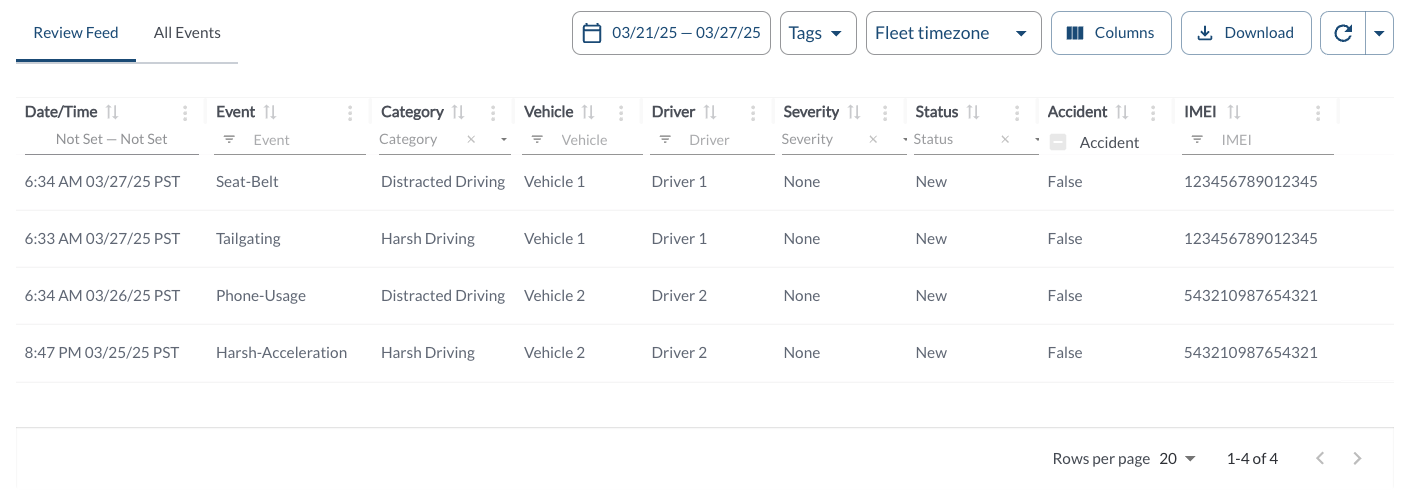
Events Details
The table includes the following columns, each providing specific event information:
| Date/Time |
The date and time when the event triggered |
| Event |
The name of the event. For more information, see the article Understanding Safety Events. |
| Category |
The category of the event. For more information, see the article Understanding Safety Events. |
| Vehicle |
The name of the vehicle involved in the event |
| Status |
The current status of the event, such as reviewed or pending |
| Accident |
Indicates whether the event was classified as an accident |
| IMEI |
The 15-digit IMEI number of the assigned LytxOne Gateway (LX1-G) |
The table supports downloading, sorting, filtering, resizing columns, and other customization options. For a complete guide, read the article How to Use Tables in the App.
Filtering
Refresher Widget
Keep your data up to date by using the Refresher Widget. This allows you to reload the table data so you're always viewing the latest information. To learn more, read the article How to Set the Refresher Widget.
Exploring the Event Details Panel
When you click on an event row, the Event Details Panel opens on the left side, offering all relevant information and tools to analyze and manage the event. To learn more, read the article Understanding the Event Details Panel.