The Vehicle Details Panel provides access to detailed information about a specific vehicle directly from the Vehicle List Panel, including vehicle telemetry information, trip history and live video.
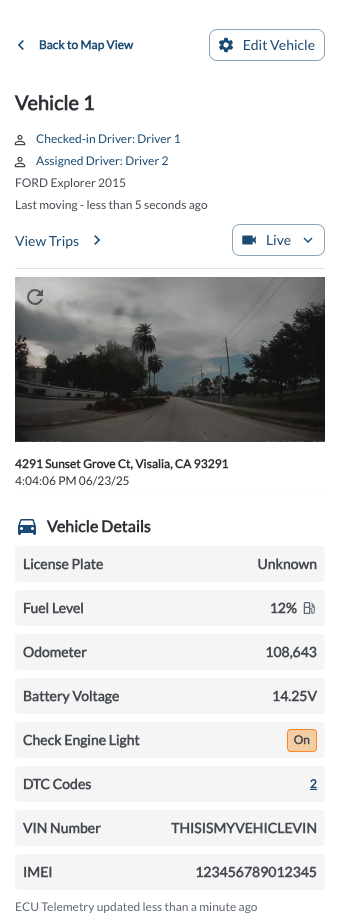
Accessing the Vehicle Details Panel
- Navigate to the Vehicle List Panel located on the left-hand side of the map page.
- Use the Search, Filter, or Sorting options to locate the vehicle of interest. For more details, refer to the Map View Overview article.
- Click on the Vehicle name in the list.
- The Vehicle Details Panel will open, displaying detailed information about the selected vehicle.
Vehicle Details Overview
| Vehicle Data |
Description |
Source |
| Vehicle Name |
The name assigned to the vehicle |
User |
| Driver |
The driver associated with the vehicle |
User |
| Make/Model/Year |
Manufacturer details, model, and production year |
OBDII/J1939 |
| Last Moving Time |
The most recent time the vehicle was in motion |
GPS |
| Camera Snapshot |
A single snapshot provided by the Road and Cabin cameras |
Camera |
| License Plate |
The license plate number associated with the vehicle |
User |
| Fuel Level |
The current fuel percentage |
OBDII/J1939 |
| Odometer |
The total mileage of the vehicle |
OBDII/J1939 |
Battery Voltage
|
The current voltage level of the vehicle's battery |
OBDII/J1939 |
| Check Engine Light |
Indicates whether the engine light is currently active |
OBDII/J1939 |
| DTC Codes |
The count of diagnostic trouble codes currently reported by the vehicle |
OBDII/J1939 |
| VIN Number |
The unique identifier assigned to the vehicle. (Configured) indicates the VIN was manually assigned via the Set VIN option. |
OBDII/J1939/manual |
Vehicle Actions