New: Health History Page
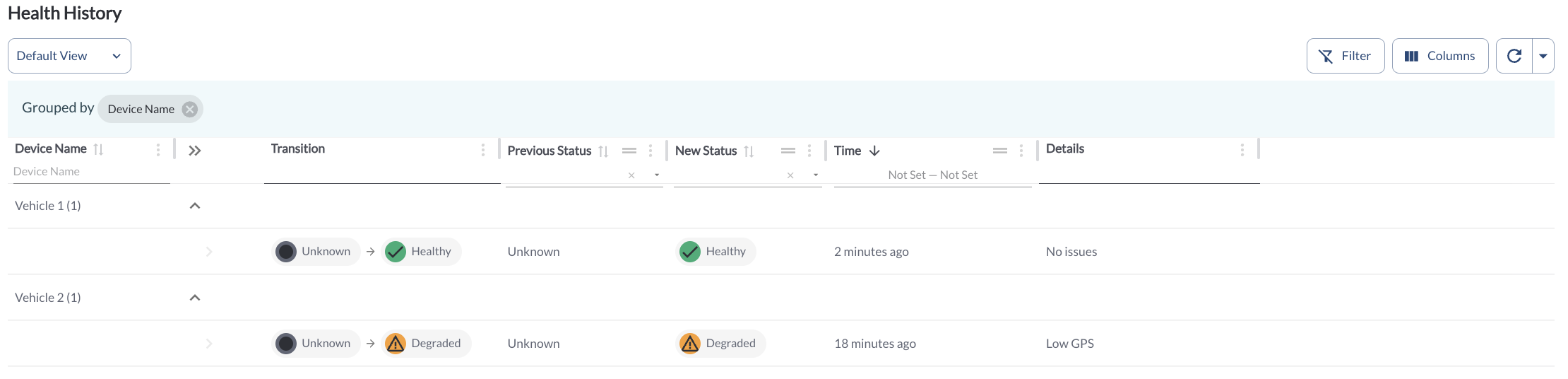
The Device Health section now includes a Health History page, providing a full log of all health status changes for each device. Each entry displays the status change and the reason it was triggered, giving fleet managers full visibility into the health timeline of their devices and making it easier to identify recurring issues or track resolution progress.
Learn more → Understanding Device Health History
New: Device Health Status - Stale
A new device health status, Stale, has been introduced in Device Health. A device is marked as Stale when no health indication has been received from it in the last 24 hours, helping fleet managers quickly identify devices that may have lost connectivity or stopped reporting.
Learn more → Monitoring the Fleet Health
Improvement: Odometer and Engine Hours on the Assets Page
The Assets page now includes Odometer and Engine Hours columns, giving fleet managers quick access to key vehicle usage data without navigating to individual vehicle profiles. These columns are hidden by default - to enable them, open the column selection menu and select Odometer and/or Engine Hours.
Learn more → Managing Your Fleets Assets
Improvement: Custom Report Widget Now Available in Trip Report and Assets
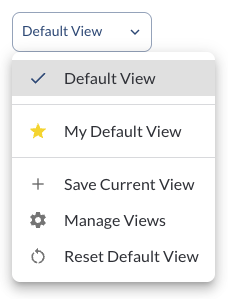
The Custom Report Widget is now available in the Trip Report and Assets pages. Save your preferred filters, columns, sorting, and grouping as a custom report to quickly return to commonly used configurations and set a default view for easy access.
Learn more → How to Use Custom Report
Bug Fixes
Map - Single Vehicle View |
Fixed an issue where vehicle movement on the map was not rendering smoothly. |
| Map |
Fixed recenter zoom issues. |
Recordings |
Fixed an issue where the device connection was dropping during recording playback. |
Recordings |
Fixed a display issue where auxiliary camera feeds were not rendering correctly. |
| Safety Center |
Fixed retrieval of aux camera video/image safety events |