New: Disable Road Camera
Fleet managers can now disable the road camera at both the fleet level and the vehicle level. When disabled, the road camera feed will not be recorded or streamed. This setting can be configured in Fleet Settings for a fleet-wide default, or overridden per vehicle in Asset Configuration.

New: Export Button on the Assets Page
The Assets page now includes an Export button, allowing fleet managers to download the full assets list with all visible columns and applied filters. This makes it easier to share or analyze asset data outside of the Fleet Portal.

Improvement: Minimum Name Length Reduced to 2 Characters
The minimum character length for human-typed name fields has been reduced from 3 to 2 characters across users, drivers, assets, and tags. This provides more flexibility when naming records with short but valid identifiers.
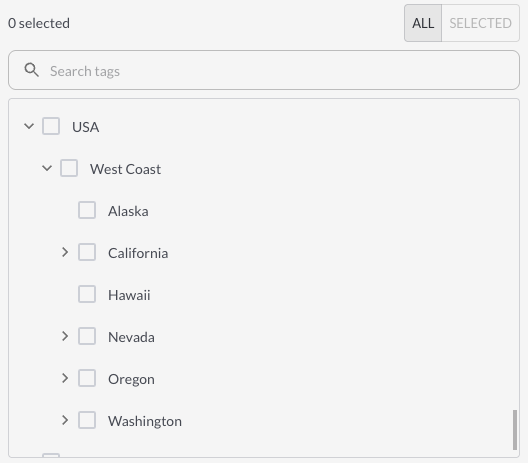
Improvement: Enhanced Tag Selection
The tag selection panel has been redesigned across the platform for a smoother, more intuitive experience. Pagination, search, and filtering are now available wherever tags can be assigned including Alerts, Maintenance, DVIR, and other tag filters throughout the Fleet Portal.
Bug Fixes
| Maintenance |
Fixed an issue preventing maintenance records from being created correctly. |
| Maintenance |
Fixed an issue with incorrect maintenance schedule calculations. |
| Fuel Data |
Fixed an issue where SSE was returning different fuel values than the API and UI. |
| Installation Report |
Fixed an issue affecting the generation of the installation report. |
| Installation Report |
Fixed an issue where images were not displaying correctly in the installation report. |
| Speeding Event |
Removed an incorrect error message indicating missing media on speeding events. Speeding events do not include media by default. |
| Video Downloads |
Fixed an issue causing a zip error when downloading multiple video files simultaneously. |