The Vehicle Details Panel provides access to detailed information about a specific vehicle directly from the Vehicle List Panel, including vehicle telemetry information, trip history and live video.
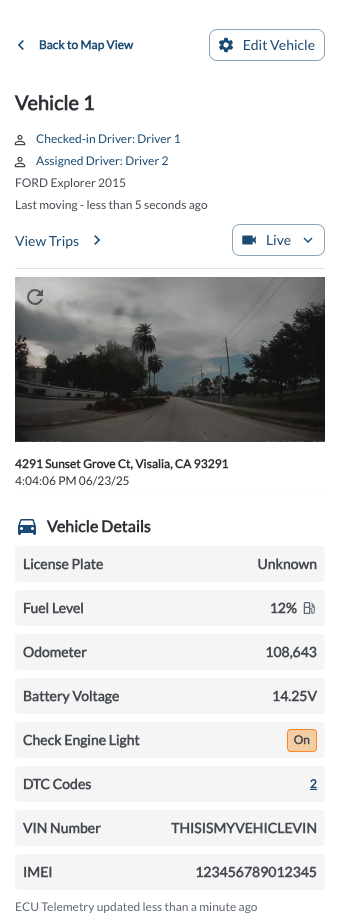
Accessing the Vehicle Details Panel
- Navigate to the Vehicle List Panel located on the left-hand side of the map page.
- Use the Search, Filter, or Sorting options to locate the vehicle of interest. For more details, refer to the Map View Overview article.
- Click on the Vehicle name in the list.
- The Vehicle Details Panel will open, displaying detailed information about the selected vehicle.
Vehicle Details Overview
| Vehicle Data |
Description |
Source |
| Vehicle Name |
The name assigned to the vehicle |
User |
| Driver |
The driver associated with the vehicle |
User |
| Make/Model/Year |
Manufacturer details, model, and production year |
OBDII/J1939 |
| Location Reported |
How long ago the vehicle last reported its location |
GPS |
| Camera Snapshot |
A single snapshot provided by the Road and Cabin cameras |
Camera |
| License Plate |
The license plate number associated with the vehicle |
User |
| Fuel Level |
The current fuel percentage |
OBDII/J1939 |
| Odometer |
The total mileage of the vehicle |
OBDII/J1939 |
Battery Voltage
|
The current voltage level of the vehicle's battery |
OBDII/J1939 |
| Check Engine Light |
Indicates whether the engine light is currently active |
OBDII/J1939 |
| DTC Codes |
The count of diagnostic trouble codes currently reported by the vehicle |
OBDII/J1939 |
| VIN Number |
The unique identifier assigned to the vehicle. (Configured) indicates the VIN was manually assigned via the Set VIN option. |
OBDII/J1939/manual |
| IMEI |
The unique identifier assigned to the device's cellular module |
Device |
| Device Type |
The type of hardware installed on the vehicle (e.g., Gateway, Asset Tracker) |
Device |
Vehicle Actions
* Subject to available cellular network connectivity.
**Live stream feature may have an approximate delay of 10 seconds. Live stream should never be used to assist the driver in operating the vehicle. The driver is responsible for the safe operation of the vehicle at all times and must always take measures to avoid an accident.