The FYI Notify queue holds events that are worth being aware of but do not require a coaching session. Use it for behaviors you want visibility on without adding to your coaches' workload.
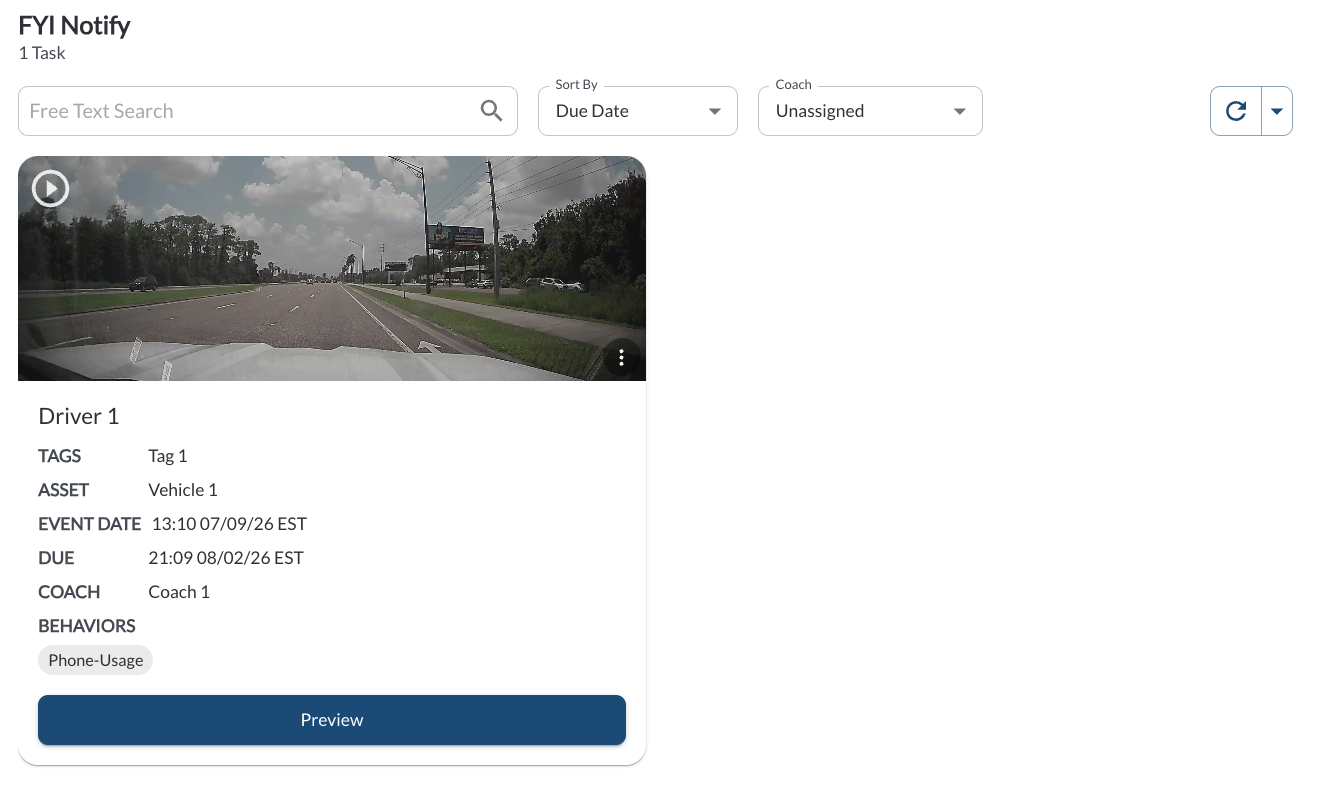
Filtering
The count of open tasks is displayed above the filter bar as X Tasks. The following filters are available:
| Filter by Coach |
Defaults to Assigned to Me. Switch to All Coaches, Unassigned, or a specific user. |
| Search by Free Text |
Searches by free text. |
| Sort By |
Due Date (default), Driver Name, or Recently Created. |
Note
Because Filter by Coach defaults to Assigned to Me, the page appears
empty if no tasks are assigned to you. Switch to All Coaches to see the
full queue.
Task Card Details
FYI cards use the same layout as the other queues, with two differences:
- The button at the bottom of the card is Preview rather than Coach X Events. It opens the event video* without creating a coaching session.
- The driver name can read Driver Unassigned when no driver is linked to the event.
Quick Action Menu
Click the three-dot menu at the top right of a card to open the available actions:
| Preview |
Open the media view |
| Add Recognition |
Records a positive recognition for the driver. Read the article How to Add a Recognition. |
| Dismiss Latest Event |
Marks the last event as recorded incorrectly, so it stops affecting the driver's Safety Score. Read the article How to Dismiss an Event. |
What Reaches This Queue
Any behavior set to the FYI Notify coaching status in Settings > Coaching Workflow, and any task moved here manually using Move to FYI from a task card. Read the article Understanding Coaching Statuses and Queues.
*Subject to available cellular network connectivity.