The Driver Profile is the single view of one driver's safety performance. It shows their Safety Score, how that score was built up behavior by behavior, their events, their coaching history, and their recognitions.
The profile has no menu entry. Open it by clicking a driver's name anywhere in the module – on a task card, in the Open Tasks Report, the Driver Report, the Safe Driving Report, the Coaches Report, or the Coach Profile.
Page Header

The header shows the driver's name, driver ID, email, and group chips, plus two actions:
| Coach X Events |
Opens a coaching session for the driver. Displayed only when the driver has at least one open coaching task. |
| Add Recognition |
Records a positive recognition for the driver. |
Period Selection

Use the preset buttons in the page body to change the period: 7d, 30d, 90d, 180d, or 365d. The default is 30 days. The selection drives the metrics, the scorecard, and the Events tab.
Metrics

| Safety Score |
The driver's score for the period, from 0 to 100, shown to two decimal places. The caption below shows the total deductions in points and the distance driven. |
| Coachable Events |
Events with a coachable Coaching Status. The caption shows the total number of events in the period. |
| Recognitions |
Recognitions in the period, both automatic and manual. |
| Dismissed |
Events marked as dismissed. These are excluded from the score. |
| Unresolved |
Displayed only when greater than zero. Events for a behavior that has no Coaching Status configured and no platform default. These contribute zero to the score. |
Note
If an Unresolved count appears, review the behavior in
Settings > Coaching
Workflow and set a Coaching Status
and a score for it, so future events are
routed and scored.
Driver Scorecard
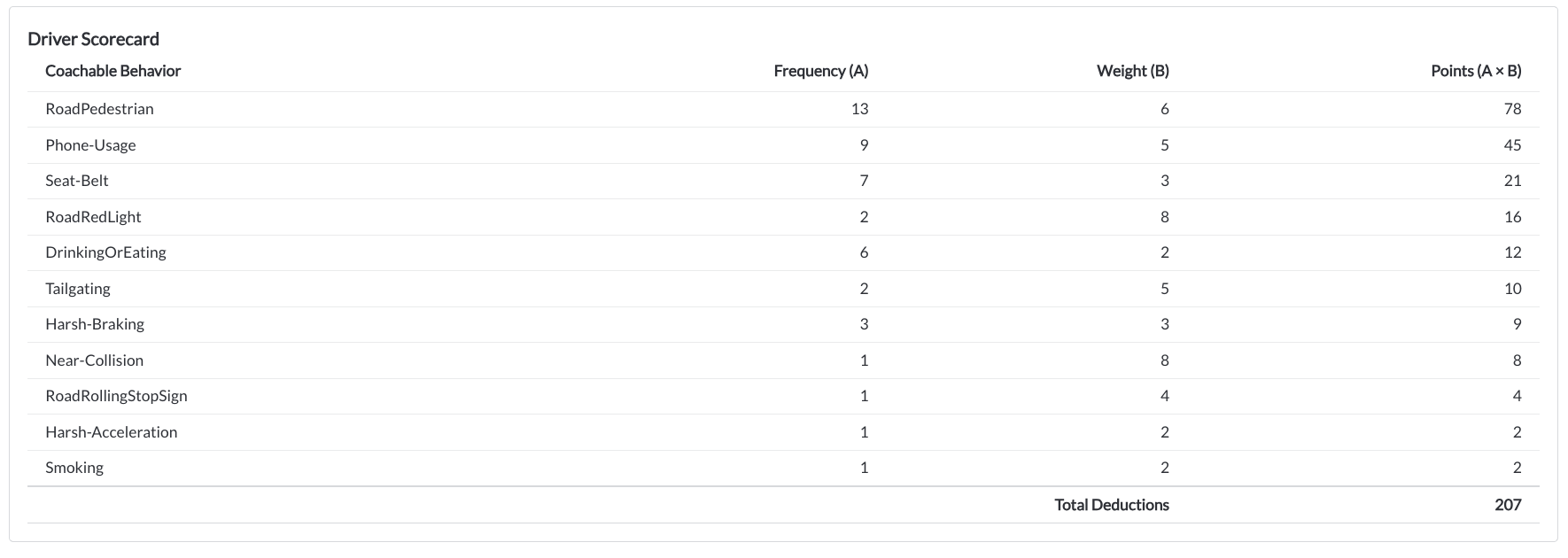
The scorecard breaks the score down per behavior, so you can see exactly what is affecting it:
| Coachable Behavior |
The behavior name. |
| Frequency (A) |
How many times it occurred in the period. |
| Weight (B) |
The score resolved for this driver, taking any group override into account. |
| Points (A × B) |
The contribution to deductions. Negative for recognitions and zero for dismissed events. |
| Total Deductions |
The sum of all points, before distance is applied. |
For the full calculation, read the article Understanding the Driver Safety Score.
Events Tab

| Event Date |
When the event occurred. |
| Trigger |
The behavior that created the event. |
| Category |
The behavior category. |
| Severity |
None, Minor, or Major. |
| Status |
The current event status. |
| Asset |
The vehicle the event was recorded on. |
Note
The Events tab shows the 100 most recent events. When more exist, a banner
reports the total and suggests narrowing the period. To browse without a
cap, use Library > Events.
Coaching History Tab

Coaching sessions completed for this driver in the last 365 days:
| Coach Date |
When the session was completed. |
| Coach |
Who ran the session. |
| Action Plan |
The follow-up recorded for the session. |
| Behaviors Coached |
The behaviors covered, shown as chips. |
Recognitions Tab

| Issued |
When the recognition was issued. |
| Source |
auto when issued by a Coaching Workflow rule, or manual when issued by a user. |
| Issued By |
The user who issued it, or auto for workflow-issued recognitions. |
| Reason |
The reason entered by the user, or the behavior for automatic recognitions. |