New: Settings Config Profiles
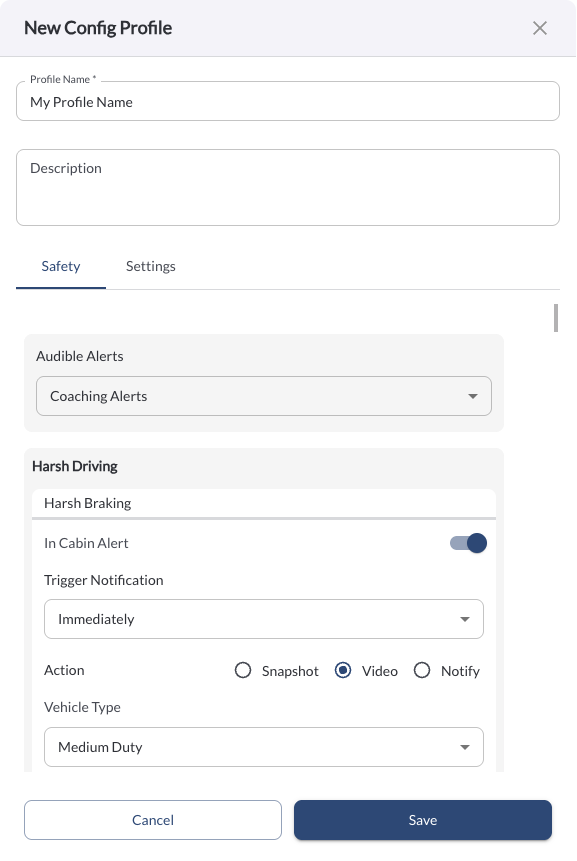
Fleet managers can now create Config Profiles under the new Settings Profile tab in Settings. Each profile defines a set of Safety and Settings configurations that can be assigned to a tag, automatically applying those settings to all assets that carry that tag. This makes it easier to manage different configuration requirements across vehicle groups, regions, or departments without configuring each asset individually.
Learn more → Settings Config Profiles
New: Config Source Column in the Assets Table
The Assets table now includes a new Config Source column, showing the origin of each asset's current configuration at a glance. Possible values are:
-
Fleet Default – The asset is using the fleet-wide default settings.
-
Profile name – The asset is using a Settings Profile assigned via a tag.
-
Vehicle Override – The asset has settings configured at the individual vehicle level, overriding any fleet or profile defaults.
Learn more → Managing Your Fleet Assets

New: Individual Vehicle Mileage Report (IVMR)
A new Individual Vehicle Mileage Report (IVMR) is now available under Reporting & Analytics. The IVMR is a standard compliance report that breaks down mileage per vehicle across jurisdictions, enriched with odometer readings. It provides fleet managers with the data needed to support IFTA fuel tax filings and mileage-based compliance reporting at the individual vehicle level.
Learn more → Individual Vehicle Mileage Report (IVMR)
New: Additional Domain Access
LytxOne is now also accessible at app.lytxone.com (Fleet Portal) and reseller.lytxone.com (Reseller Portal), in addition to the existing RoadEazy domains. Users can log in using either domain with their current credentials.
Bug Fixes
Area / Page |
Description |
Media - Permissions |
Fixed camera images and videos displaying to users without the View Media permission. |